Your AI second brain
No new apps.
No new habits.
Your tasks, goals, notes, and plans — captured, connected, and created, all from a single conversation.
Crispin takes care of it all, so you can get on with your day.

Your day with Crispin
Your Day with Crispin
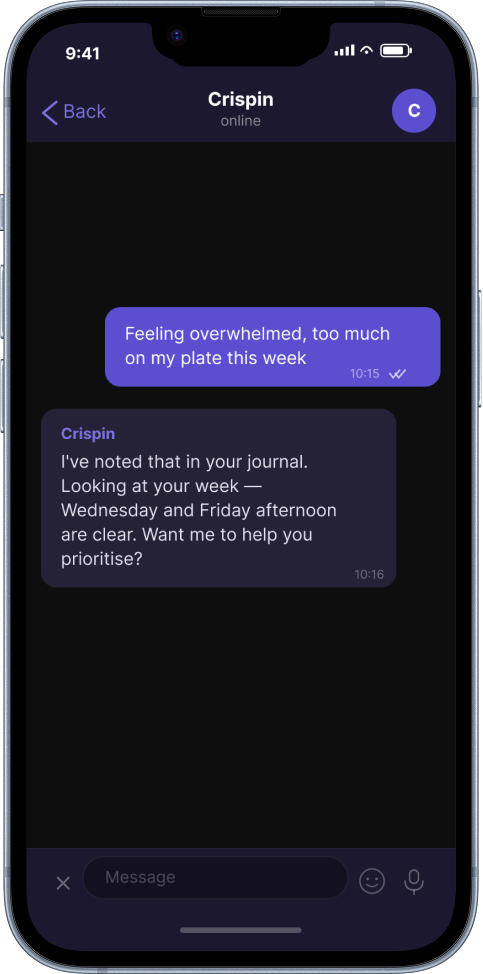
8:00am
You’re drinking your coffee. A message arrives.
You didn’t ask for this. It was just there.
10:47am
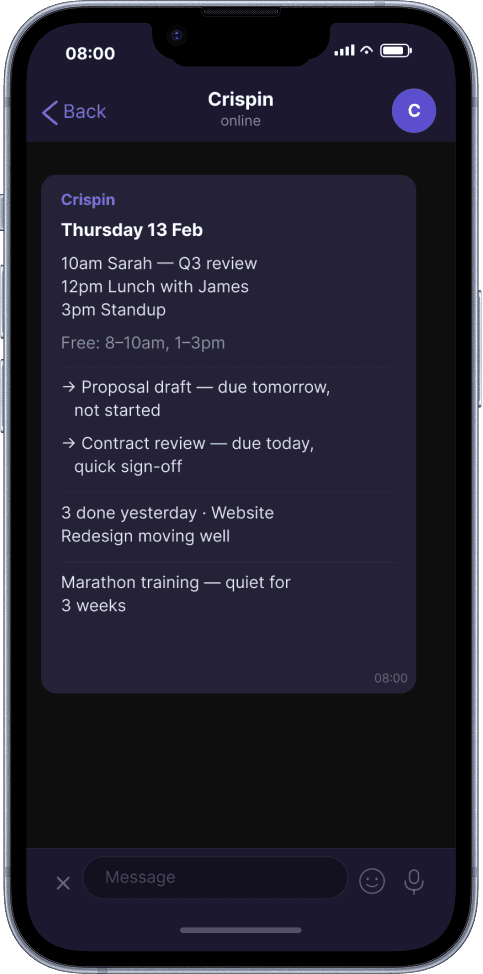
You’re in a meeting. You pick up your phone.
Two messages. It’s already handled.
1:15pm
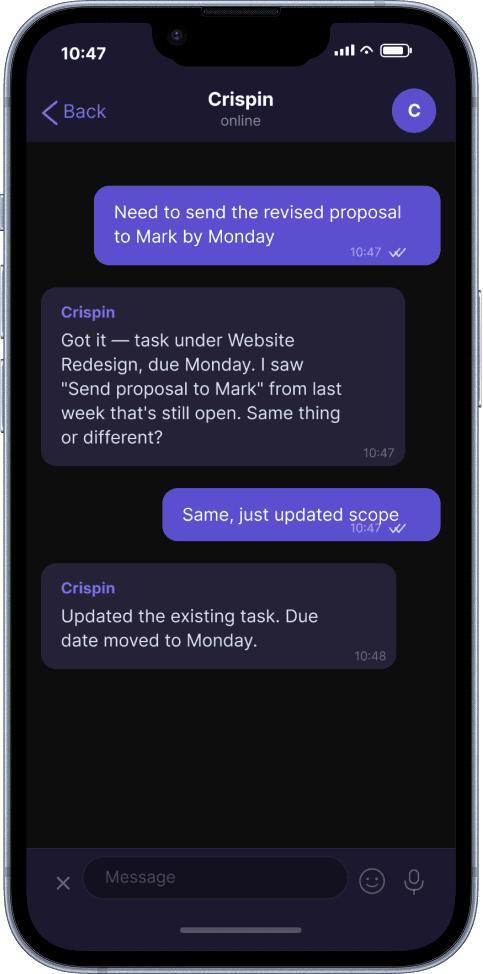
You’ve got a gap in the afternoon. You ask.
He didn’t just suggest a task. He found notes you’d forgotten you’d written.
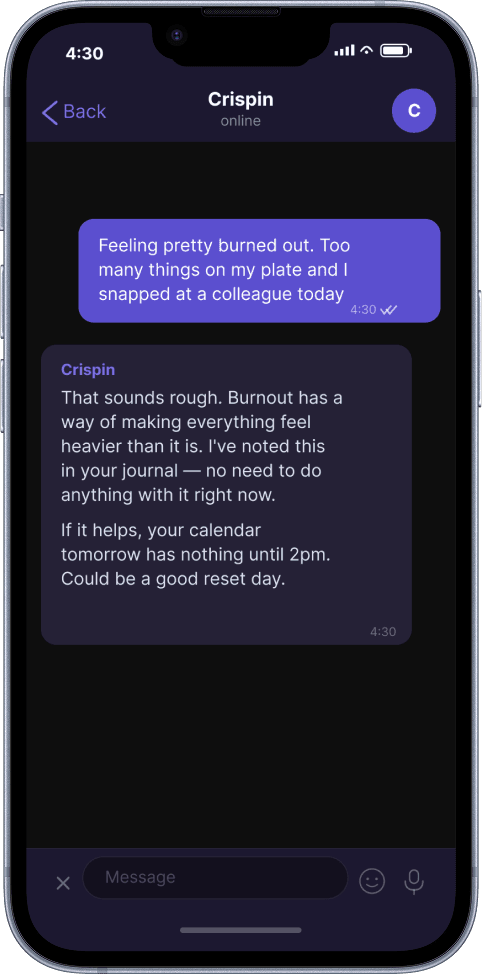
4:30pm
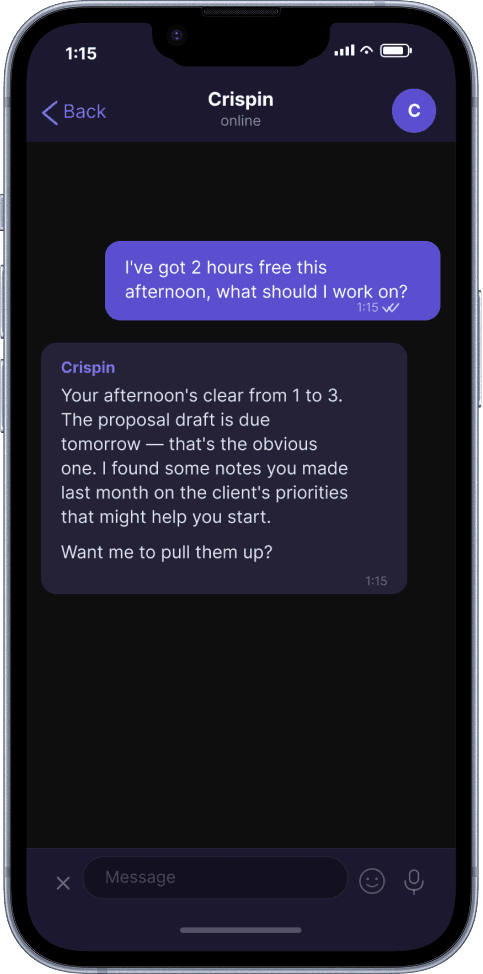
The day has caught up with you.
You didn’t send a task. You sent a feeling. Crispin just held it.
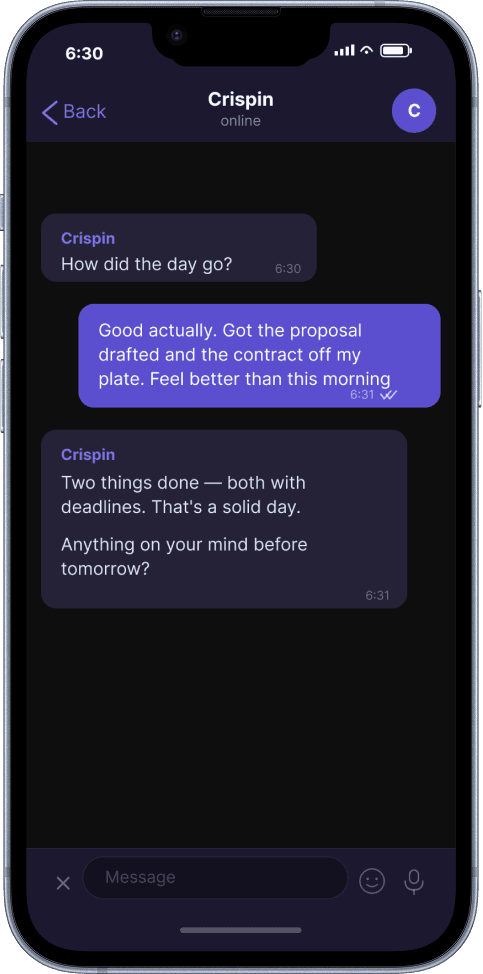
6:30pm
You’re on the sofa. Crispin checks in.
If you want to keep talking, he’s there. If not, that was enough.
How it works
How it works
Crispin lives in your Telegram.
Crispin is a conversation in Telegram — the messaging app already on your phone. No app to download. No dashboard to check.
You text him the same way you’d text anyone, and he responds in seconds. The conversation is always there when you need it and silent when you don’t.
Crispin works in your Notion.
When you connect your Notion workspace, Crispin reads every page you’ve shared with him. He knows your databases, your projects, your notes, your structure.
When something changes — a page edited, a status updated, a new document added — he sees it. When he captures something for you, it appears in your Notion exactly where it should be.
Your workspace is always the source of truth. Crispin keeps up with it, writes to it, and never falls behind.
Crispin knows your calendar.
Connect Google Calendar and Crispin sees your day — meetings, free slots, what’s coming up this week. Your morning briefing includes your schedule.
Your planning conversations factor in when you’re actually free. And when you need to block out time — “two hours tomorrow morning for deep work” — he creates the event with a text.
He reads and creates. Your existing events are yours to manage.
What you can text
What can you text Crispin?
Whatever’s on your mind
“Send contract to Sarah by Friday”
“Just got out of standup — we’re pushing the launch to March”
“Interesting article on team structures, save it somewhere”
That thing you can’t quite remember
“What was that note about the client’s budget?”
“What did I say about the restructure last month?”
“Pull up everything related to the product launch”
The dots you haven’t connected
“Is this related to anything else I’ve been working on?”
“I keep coming back to the same theme in my journal — what’s the pattern?”
“Didn’t someone at work mention something similar?”
When you need a plan
“What’s on my plate this week?”
“I’ve got two hours free, what should I focus on?”
“Help me break this project into actual next steps”
The truth about where things stand
“How’s the promotion goal going?”
“What’s been sitting untouched the longest?”
“Am I actually on track for the marathon?”
When it’s not about tasks
“Feeling anxious about the presentation tomorrow”
“Had a great day — finally feel like things are clicking”
“I’ve been putting this off for weeks and I don’t know why”
Your workspace
Your system, or a new one
You built it with care. Databases, relations, views — a system that reflected how you actually think. The fact that you stopped using it doesn't mean it failed. It means it needed more than one person maintaining it.
Crispin reads what you've built, learns the structure, and works within it. Your databases. Your naming conventions. Your way of doing things. He doesn't reorganise. He doesn't impose. He maintains — and the system you built starts working again.
You've started systems before. The concern isn't whether this one will work — it's whether you'll still be using it in three months.
Crispin sets up a proven structure during your first conversation — areas, goals, projects, tasks, notes, and a journal. You don't read a setup guide. You have a conversation about what you're working on, what matters to you, what's been on your mind. By the end of it, the system exists and it's already populated with your real life. Within a week, you'll have a working second brain you didn't have to design. Within a month, you'll understand why it works.
Methodology
Standing on the shoulders of giants
Crispin doesn't invent a methodology. He borrows the best parts from ones that already work.
Getting Things Done
Capture everything the moment it occurs to you. Your mind is for having ideas, not holding them.
Building a Second Brain
Connect ideas across domains, surface what’s relevant when it’s relevant, let your notes compound over time.
Goal-Based Planning
Every task serves a project, every project serves a goal, every goal sits within an area of your life.
The hard part was never understanding the methodology. The hard part was sustaining the discipline to run it. That's Crispin's job.
Trust
Privacy
You'll text Crispin things you wouldn't put in a work email. Plans, anxieties, half-formed ideas, journal entries about difficult days. He takes that seriously.
Your content lives in your Notion workspace — you can browse, edit, and delete it at any time. Revoking access takes one click. Ask Crispin what he knows about you whenever you like. He'll tell you, and he'll forget anything you ask him to.
Pricing
Pricing
Start free
Your first 50 messages are on us. No card required.
Then keep going
One plan. Everything included. Cancel anytime.
FAQ
Questions people ask
No. During your first conversation, Crispin sets up a workspace for you — areas of your life, goals, projects, tasks, notes, and a journal. It’s a proven structure based on established productivity methodologies, and you’ll learn it by using it rather than reading about it. If you already have a Notion workspace, Crispin reads what you’ve built, learns your databases and naming conventions, and works within your existing structure. He doesn’t reorganise. He adapts.
Only what you choose to share. During Notion setup, you select which pages and databases Crispin can access. You can change this at any time in your Notion settings. If you connect Google Calendar, Crispin can read your events and free slots to make briefings and planning more useful. Calendar data is fetched live — never stored.
Crispin sends it to your Telegram at a time you choose during setup. It includes your calendar for the day, tasks approaching their deadlines, anything that’s been sitting untouched, and a note about goals that have gone quiet. It’s glanceable — designed to be read in ten seconds over coffee, not studied. If your day is empty, the briefing is short. Crispin doesn’t manufacture things to tell you.
An optional check-in. Crispin asks how the day went. If you want to reflect, the conversation continues — he’ll capture a journal entry in your own words and notice patterns over time. If you don’t feel like talking, the message stands on its own. No guilt. You can turn evening check-ins off entirely.
Yes. He builds a profile from your conversations — your communication style, what energises you, what you tend to avoid, your stress patterns, your goals and how you talk about them. This is how he calibrates everything from the tone of a morning briefing to whether a nudge should push harder or back off. You can ask him what he knows about you at any time, and he’ll tell you. You can correct anything or ask him to forget it.
No. But you’ll understand the difference within a day of using him. Crispin has a persistent memory of your goals, your projects, your patterns, and your emotional state. He doesn’t start fresh every conversation. He picks up where you left off because he remembers where you left off. He’s proactive — he shows up with a briefing before you ask, nudges you when things go stale, and notices connections across weeks of content. A general-purpose chatbot can answer questions. Crispin runs your system.
Your Notion workspace is unchanged — it was always yours. Every task, note, goal, and journal entry stays exactly where it is. Crispin’s working copy of your content is deleted within 30 days, or immediately on request. Your conversation history, profile, and preferences are deleted on the same timeline. If you come back later, Crispin starts fresh — he re-reads your workspace and the relationship builds again.
Your first 50 messages are free. Full access to everything — morning briefings, evening reflections, capture, planning, reminders, the lot. After that, it’s $9.99 per month. One plan. Everything included.
Yes. “Block out two hours tomorrow morning for deep work” — Crispin creates the event in your Google Calendar. He can also tell you when your next free slot is, what your week looks like, and factor your calendar into planning suggestions. He reads and creates events but won’t modify or delete existing ones.
Crispin takes it seriously. He’ll capture it in your journal if appropriate, notice patterns if they emerge, and never bring it up at the wrong moment. Your personal content lives in your Notion — you own it, you can delete it, and no one else can see it. Crispin doesn’t analyse your content for product purposes. Your data is yours.
You text him. “Remind me to call the accountant on Thursday.” On Thursday, a message arrives with the context of what you asked for. Simple, one-shot reminders. If you need to cancel, just tell him.
Yes. Most people do. Your areas might include Career, Health, Finances, Family, and a side project. Crispin keeps them organised separately but sees the full picture — which is how he can notice that your marathon training has gone quiet while your work tasks have tripled. The structure supports whatever matters to you.
Your content is stored in your Notion workspace (which you control) and in Crispin’s encrypted database for search and context. All data is encrypted in transit and at rest. Crispin is fully GDPR compliant. You can export all your data at any time — Crispin assembles it as a download and sends you the link. You can request full deletion at any time, and it happens.
Tell him. “That should be under the marketing project, not sales.” He’ll fix it. “Undo that.” He’ll reverse the last action. He’s not perfect — but he owns mistakes and corrects quickly. The more you use him, the better he gets at understanding how you organise things.
Your mornings are about to feel different.
Text Crispin anything. He'll remember.